

⭐Introduction to The Complete Guide to Staff Augmentation in 2026

Imagine you are building a treehouse.
You need help.
Sometimes you need a carpenter… sometimes a painter… sometimes just extra hands.
That’s what companies do too!
When they need more people for some time, they use Staff Augmentation.
In this guide, you will learn:
-
What staff augmentation means
-
How companies use it
-
Why it is popular in 2026
-
How YOU can use it if you run a business
-
Real stories, tips, and mistakes to avoid
Let’s start!
⭐ Key Concepts & Definitions
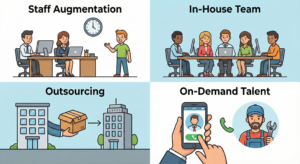
Before we begin, let’s understand the different ways companies get work done.
1. Staff Augmentation
This means:
A company hires extra people for a short time to finish work faster.
Example:
A school hires extra teachers only during exam season.
2. In-House Team
These are full-time employees who work all year.
Example:
Your class teacher who teaches every day.
3. Outsourcing
When a company gives work to another company.
Example:
Your school ordering food from outside instead of cooking inside.
4. On-Demand Talent
People you hire only when needed.
Example:
Calling a plumber when a pipe leaks.
⭐ Step-by-Step Framework (How Staff Augmentation Works)
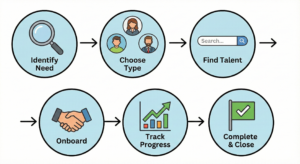
How do you actually do it? It’s a simple process.
Step 1: Identify the Need
Ask: “What skills do we need right now?”
Step 2: Choose the Type
-
Short-term staff
-
Long-term staff
-
Specialized experts
Step 3: Find the Talent
Use websites like:
-
Upwork
-
Fiverr
-
LinkedIn
-
Remote job portals
Step 4: Onboard Them
Show them:
-
The project
-
Your goals
-
The deadlines
-
The rules
Step 5: Track Progress
Use simple tools like:
-
Trello (for moving tasks)
-
Notion (for notes)
-
Google Sheets (for lists)
Step 6: Complete & Close
Once the work is done, say thank you and end the contract.
⭐ Tools, Techniques & Best Practices
To make staff augmentation work well, you need the right tools and habits
Best Tools
-
Slack ➡ For quick chatting and daily check-ins.
-
Google Docs/Drive ➡ For sharing files and working on documents together.
-
Zoom / Google Meet ➡ For face-to-face video meetings.
-
Asana / Trello ➡ To see who is doing which task.
Best Techniques
-
Set clear goals: Explain exactly what “success” looks like before they start.
-
Keep communication simple: Use easy English, especially if working with people from different countries.
-
Give daily updates: A quick 5-minute chat in the morning helps everyone stay on track.
-
Respect time zones: Be mindful if your helper is sleeping when you are working.
Best Practices
-
Hire slowly
-
Test skills first
-
Start with small tasks
-
Pay on time
⭐ Common Mistakes & How to Avoid Them
Even smart companies make mistakes. Here is how to avoid the biggest ones.
❌ Mistake 1: Hiring too fast
Fix: Always check skills with a small test.
❌ Mistake 2: No clear instructions
Fix: Give examples and show a sample.
❌ Mistake 3: Not tracking work
Fix: Use simple tools like Google Sheets.
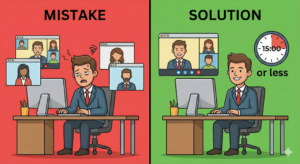
❌ Mistake 4: Too many meetings
Fix: Keep meetings short. Max 15 minutes.
❌ Mistake 5: Not checking communication skills
Fix: Have a short video call before hiring.
⭐ Case Studies & Real-Life Examples
Here is how different types of businesses used staff augmentation successfully.
1. The Small Bakery Story- A local bakery wanted to start selling cakes online but didn’t know how to build a website.
-
Action: They hired a freelance website designer for just 20 days using staff augmentation.
-
Result: The site went live quickly, and their cake sales doubled because people could order from home.
2. The School Project Story- A school needed a simple mobile app for students to check homework. They didn’t have the money to hire a full-time engineer all year.
-
Action: They hired a part-time app coder for 2 months.
-
Result: The app worked great, the project finished on time, and they saved money by not hiring a permanent staff member.
3. The Startup Growth Story- A new startup had a great product but needed help launching it to the public.
-
Action: They hired a specialized marketing expert for 3 months to help them launch.
-
Result: The expert ran the launch campaign, trained the existing team on how to do it, and then left. The company kept growing using the new skills they learned.
⭐ Action Plan (What You Should Do Next)
-
Write down the skills you need
-
Decide if you need short-term or long-term help
-
Make a small test task
-
Choose a platform (LinkedIn, Upwork, Fiverr)
-
Start with one person
-
Track work daily
-
Improve based on feedback
⭐ Conclusion
Staff augmentation is like calling extra helpers when you need them most.
It saves money, saves time, and gives you expert skills quickly.
In 2026, more companies use this method because it is fast, simple, and smart.
Use this guide whenever you need extra hands for your work.
⭐ FAQs
1. What is staff augmentation?
It means hiring extra people temporarily to help your existing team finish work.
2. Why do companies use it?
To finish projects faster without the long process of hiring permanent full-time staff.
3. Is it expensive?
Usually, no. It is often cheaper because you only pay for the specific work time you need, without paying for year-round benefits.
4. Can small businesses use it?
Yes! Even a tiny one-person shop can use it to hire a helper for a week.
5. What skills can I hire this way?
Almost anything! Designers, writers, coders, video editors, marketers, virtual assistants-any skill that can be done on a computer.
6. Is it safe?
Yes, if you use trusted platforms (like Upwork or LinkedIn) and always check their reviews and past work before hiring.
Leave a Reply